Short answer
You need 1,000 followers and must be at least 18 to go LIVE on TikTok. TikTok’s help page adds that the follower number may vary across regions, and since May 2024 the company has been testing lower minimums for some new creators. The rules below were read on TikTok’s own pages on 18 November 2026.
Key takeaways
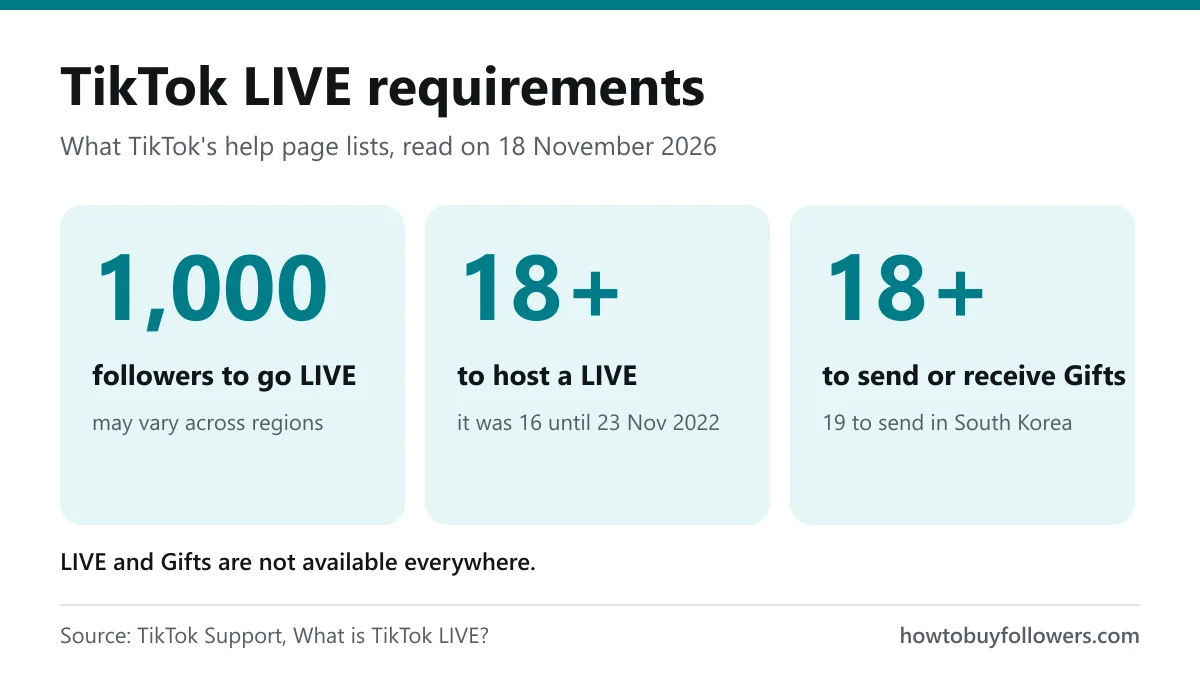
- 1,000 followers is the published threshold to host a LIVE; it may vary by region.
- 18 or older to go LIVE. It was 16 until 23 November 2022.
- LIVE Gifts need 18 to send or receive, or 19 to send in South Korea.
- LIVE and Gifts are not available everywhere.
TikTok LIVE requirements at a glance
| Requirement | What TikTok says | Where it says it |
|---|---|---|
| Followers | 1,000 to go LIVE, may vary across regions | TikTok Support |
| Age to host | At least 18 | TikTok Support, Community Guidelines |
| Age for Gifts | 18 to send or receive, 19 in South Korea | TikTok Support |
| Availability | LIVE and Gifts are not available everywhere | TikTok Support |
| Account standing | A LIVE that breaks the rules can be stopped, with temporary LIVE restrictions | Community Guidelines |
| Extra steps | Some new creators may be asked to reconfirm their age | TikTok Newsroom, May 2024 |
Is the age 16 or 18?
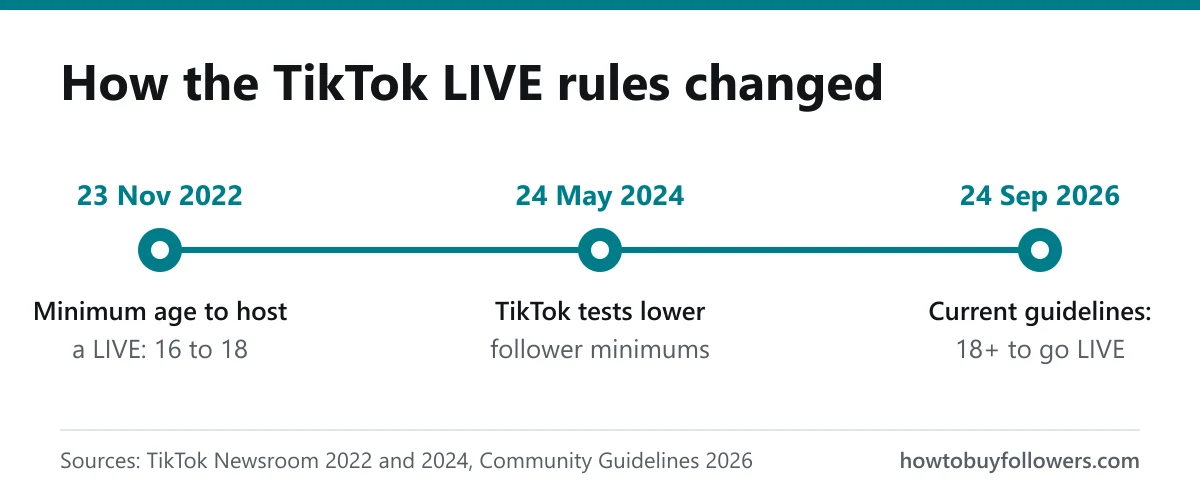
18. TikTok announced in October 2022 that the minimum age to host a LIVE would rise from 16 to 18 from 23 November that year. Pages and videos that still say 16 quote the old rule.
Is 1,000 the same in every country?
Not always. TikTok publishes 1,000 with the note “may vary across regions” and no list by country. Treat 1,000 as the default and your own app as the final word. Your follower total is the number on your profile; if you want to see what a bigger base looks like before you go LIVE, our TikTok followers page lists every package with its price and delivery pace.
Why some accounts go LIVE with fewer than 1,000 followers
If a friend went LIVE with 300 followers, they did not find a trick. In May 2024 TikTok said it was “testing different minimum follower requirements” and granting new creators LIVE features in phases. Combined with thresholds that vary by region, that explains access below 1,000 on some accounts and not others.
Claims of LIVE at 50 followers, of a lower threshold on a computer, or of a form that unlocks it early do not appear in TikTok’s help pages, guidelines or newsroom. If you see one, treat it as unconfirmed.
Can't see the LIVE button? Check these first
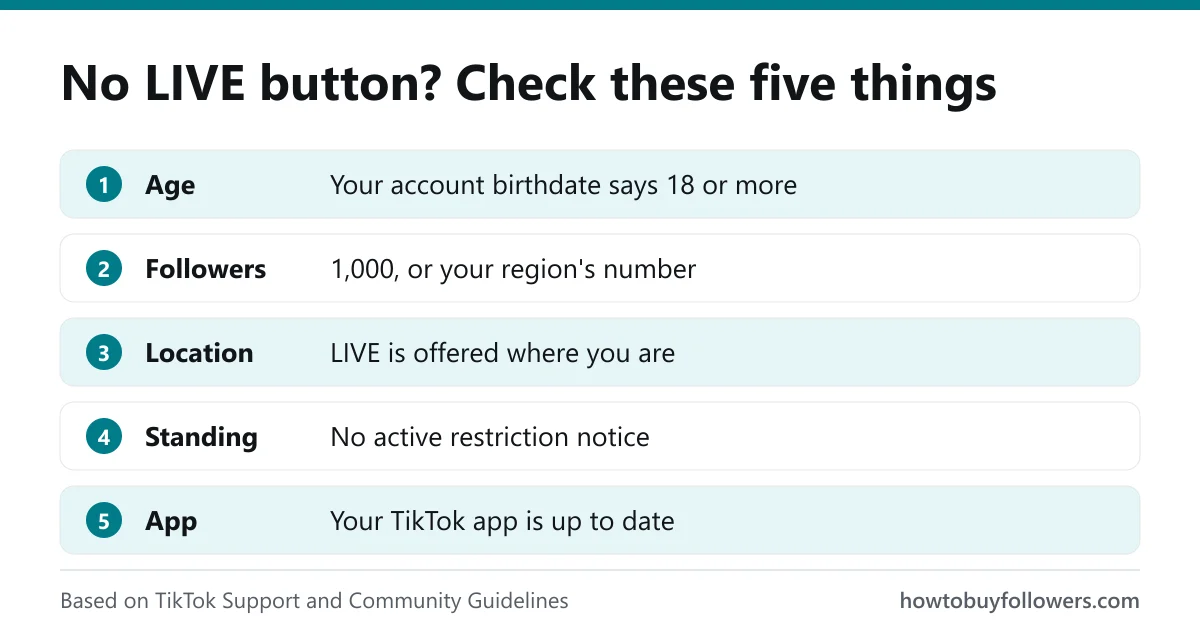
| Check | Why it matters |
|---|---|
| Your account birthdate says 18 or more | Hosting is 18+ only, and some new creators are asked to reconfirm their age. |
| You have 1,000 followers, or your region's number | Below it, the LIVE option normally does not appear. |
| LIVE is offered where you are | TikTok says LIVE is not available everywhere. |
| No active restriction | A LIVE that breaks the rules can lead to a temporary restriction from going LIVE. |
| Your app is up to date | The LIVE option sits in the create menu of current versions. |
If every line passes and the button is still missing, your region or test group may use a different threshold, which TikTok does not publish.
How to go LIVE on TikTok once you're eligible
- Tap the Add post + button at the bottom of the app.
- Tap LIVE along the bottom; you may need to scroll across.
- Add a title, use the LIVE tools or adjust your LIVE settings.
- Tap Go LIVE. To finish, tap End LIVE at the top, then End now.
You can change most settings, including safety settings, during the LIVE from More, then Settings. A title that says what you will do on stream helps people decide to join; the content idea generator can suggest topics, and the TikTok hashtag generator gives tags for the videos that announce it.
Getting people into your LIVE
Unlocking LIVE is one step; having people watch is the next. Your videos are what bring viewers to your profile, so the posts you publish before a stream matter. Our TikTok views and likes for TikTok videos pages cover those two services, and the engagement rate calculator shows how your videos perform against your follower count.
Viewers during the stream
For the stream itself, our TikTok live viewers join your LIVE once it has started, for the length of the package you choose. You give your username, never a password, as explained on why we never ask for your password. If you stream on Twitch as well, the same service exists as Twitch live viewers.
Planning your follower count
To see how long it could take to reach 1,000 at your current pace, the follower growth calculator projects it from your own numbers. Comparing services first? Our price comparison sets our TikTok followers next to other sellers, and the guide to buying followers walks through an order step by step. If a count drops after delivery, the refill policy explains how a refill works.
LIVE Gifts: separate rules
Going LIVE and receiving Gifts are two different permissions. Gifts need 18 to send or receive, 19 to send in South Korea, and are not available everywhere. TikTok decides who can earn from them. For a rough idea of what TikTok creators earn from their content, the TikTok earnings calculator gives an estimate from your own audience numbers.
Rules read on 18 November 2026
These rules come from TikTok’s help page, its Community Guidelines and its newsroom. If your app shows something different, the app is right for your account and region.Keep reading
- All our TikTok services: followers, likes, views and live viewers on one page.
- Viewers for your next TikTok LIVE, with the packages and their length.
- Buy TikTok followers, from small packages to larger ones.
Frequently asked questions
1,000. TikTok's help page lists 1,000 followers to go LIVE and adds that the number may vary across regions. You also need to be at least 18.
Some accounts can. In May 2024 TikTok said it was testing different minimum follower requirements for new creators. TikTok grants that access; it does not publish a way to request it.
18. TikTok raised the minimum age to host a LIVE from 16 to 18 on 23 November 2022. Sending or receiving LIVE Gifts also needs 18, or 19 in South Korea.
Check your age on the account, your follower count, whether LIVE is offered where you live, any restriction notice, and your app version. If all of them pass, your region or test group may have a different threshold.
Sources
- TikTok Support: What is TikTok LIVE? (read 18 November 2026)
- TikTok Community Guidelines: Accounts and features, effective 24 September 2026 (read 18 November 2026)
- TikTok Newsroom: Enhancing the LIVE community experience, 17 October 2022
- TikTok Newsroom: Helping creators build thriving LIVE communities, 24 May 2024